專案簡介

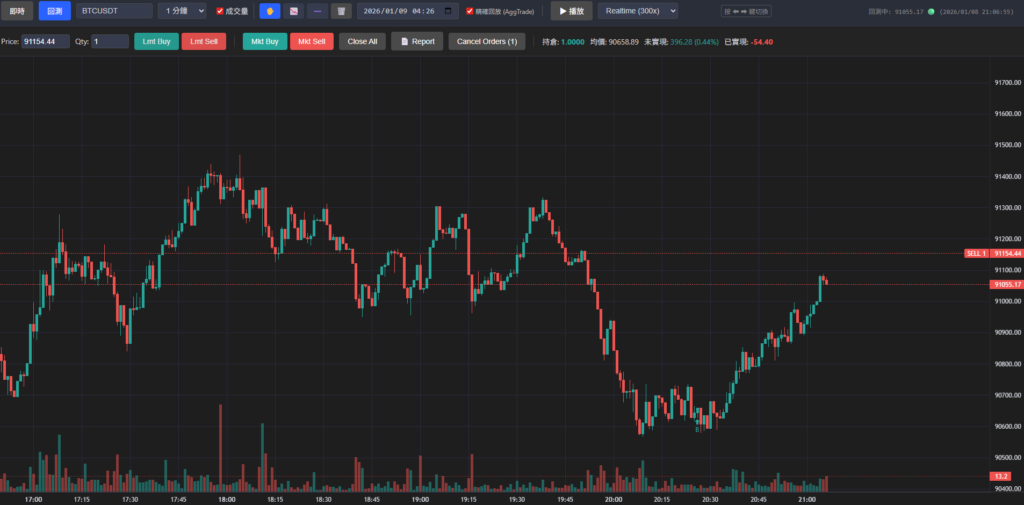
這是一個基於網頁的輕量級虛擬貨幣交易模擬與回測練習工具。本專案整合了 Binance (幣安) 的即時與歷史行情數據,並提供類似 TradingView 的專業圖表操作體驗 (基於 Lightweight Charts)。讓交易者能在不承擔真實資金風險的情況下,練習交易策略、培養盤感與進行技術分析。
主要功能
1. 即時看盤 (Realtime Mode)
- 即時數據串流:透過 WebSocket 直接連接 Binance,提供毫秒級的價格更新。
- 即時圖表:K 線圖會隨著每一筆成交自動跳動更新。
- 模擬交易:支援在即時模式下進行模擬下單,系統會自動計算損益並執行掛單。
2. 歷史回測 (Backtest Mode)
- 精確回放:使用 Binance 逐筆成交數據重播,模擬最真實的盤中跳動。
- 高效緩衝:智慧緩衝機制確保回放流暢不卡頓。
- 買賣點標註:在 K 線圖上直觀標註「B」(買進) 與「S」(賣出) 點位。
3. 模組化與單一檔案
- 單一檔案版:
index.html整合了所有功能,瀏覽器打開即用,方便分享。
4. 模擬交易系統
- 多商品狀態隔離:不同交易對的倉位與損益獨立計算。
- 下單介面:提供市價 (Mkt) 與限價 (Lmt) 下單。
- 圖表互動:點擊圖表可帶入價格;支援直接在圖表上拖曳調整掛單價格。
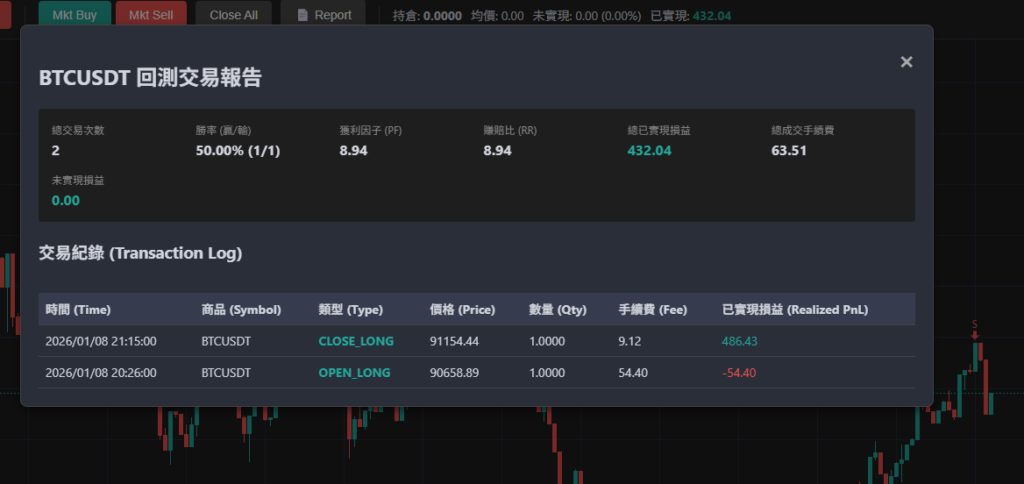
- 詳細報表:包含勝率、獲利因子 (PF)、賺賠比 (RR) 與完整交易紀錄。
使用說明
- 使用現代化瀏覽器 (Chrome, Edge, Firefox 等) 開啟。
- 即時模式:選擇交易對即可開始看盤與模擬交易。
- 回測模式:切換至「回測」模式,設定起始日期與商品。
鍵盤快捷鍵 (回測模式)
空白鍵 (Space):播放 / 暫停。
右方向鍵 (➡):前進一根 K 線 (或暫停並前進)。
左方向鍵 (⬅):後退一根 K 線 (或暫停並後退)。
Introduction
This project is a lightweight, web-based cryptocurrency trading simulator and backtesting tool. It integrates Binance real-time/historical market data and provides a professional trading experience inspired by TradingView (using Lightweight Charts). It allows traders to practice strategies and technical analysis in a realistic environment without risking real capital.
Key Features
1. Realtime Mode
- Live Data Stream: Connects directly to Binance WebSocket for millisecond-level price updates.
- Live Charting: K-line charts update automatically with every trade tick.
- Simulated Trading: Practice trading with live data. The system automatically calculates PnL (Profit and Loss) and executes limit orders based on the latest prices.
2. Backtest Mode
- Precise Replay: Replay historical market movements from Binance tick-by-tick for the most realistic simulation.
- Efficient Buffering: Smart buffering mechanism ensures smooth playback even for long backtest sessions.
- Visual Markers: Buy (“B”) and Sell (“S”) markers are plotted on the chart to visualize your trade history.
3. Modular & Standalone
- Single File Version:
index.htmlcontains everything you need. Just open it in a browser to start.
4. Trading System
- Multi-Asset Support: Independent state (position, avg price, PnL) for different trading pairs.
- Order Types: Supports Market (Mkt) and Limit (Lmt) orders.
- Chart Interaction: Click on the chart to auto-fill price in the order panel. Drag horizontal lines to adjust limit orders.
- Detailed Reports: Track your Win Rate, Profit Factor (PF), Risk-Reward Ratio (RR), and transaction history.
Usage
- Open
index.html(ormodular/index.html) in a modern web browser (Chrome, Edge, Firefox, etc.). - Realtime: Select a symbol to start watching and trading live.
- Backtest: Switch to “Backtest” mode, select a start date and symbol.
Shortcuts (Backtest Mode)
- Space: Play / Pause.
- Right Arrow (➡): Step forward one candle (or pause and step).
- Left Arrow (⬅): Step backward one candle (or pause and step).
- Delete / Backspace: Remove selected drawing objects.
GitHub: https://github.com/poof/CryptoCoinTradingViewBacktest
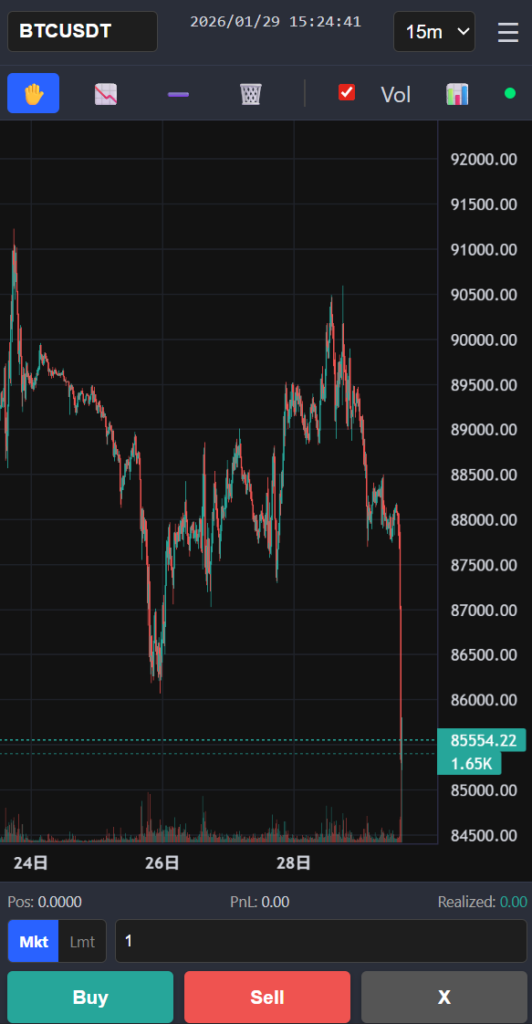
2026/01/29 mobile edtion
請問有機會推出手機板嗎?在手機上會跑版。
有機會,排版實在花時間。
已更新手機板